my project (building a lego robot NXT and programming NXT robot)

My project (building a Lego robot NXT and programming NXT robot)
Project Brief
In this project i would be doing activity led learning where I and different students within the lesson would be placed into two groups. We will be doing a project together, where we be understanding the basic concepts of computer science in the areas where we be attending computer architecture, networking and programming fundamentals through a robot projects. Which the three areas in computer science would be combined together to design, developed and test a game program (using Lego mind storm built in functions).
The project that we be doing is being able to program a Lego Robot NXT to be able to do tasks that we want it to do. These tasks would be going through an obstacle course where the robot would detect different colours, being able to pick up an object, being able to move (left, right, forward and backwards), sound (allow it go and stop), infrared etc. so within the team each of us would have a task to do, that would go towards making our robot function first and then being able to give it tasks.
First Week and Second Week
The first week we was put into groups and we were told on what the robot should do but first of all we introduce ourselves to each other, so we know each other’s skills which can be put towards to the project to be able to have a successful project.
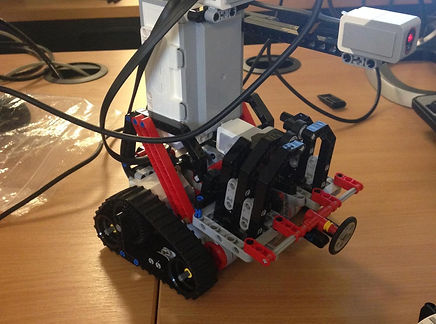
The next day we receive the Lego robot which we then decide which type of model we wanted to build. We decide to build the gripper due to the fact that the gripper was able to do more of the tasks that we want our robot to do. What we did was each of us begin working on a part of the robot where we put the parts together. Which my part was to build the arm that claw would attached to.
The images above have been taken by me, shows us trying to build the gripper model. The building of the robot took quite some time to build due to the smalls pieces that builds the robot, took some time to find.
The second week in project we began to finish off the Lego robot (gripper model). After we have finished building the Lego model robot we began to start using the Lego programming software. As a team we began to start understanding how the Lego Mind storms NXT built-in function which we will be using to be able to create our program, therefore we had to make sure that we understand the full potential of the software.
As you can see from the images so us building our Lego robot. we had to rebuild our robot due to the factthat certain parts of the robot wasnt able to perform properly the way we want it to.
Week three
The image above is the flow chart on how the robot will operate, as a team we would use this flow chart to begin creating our program for the robot. The reason for the flow chart is that it shows the different type of obstacles the user would do and also the flow chart shows what the robot will do, to be able to finish the obstacles. The flow chart shows the decisions on what the robot or the user will decide on what to do but before the decision the robot will have sensors and also motor for the user to use to get pass each obstacles. The reason why is that without the sensors or the motor the user won’t be able to finish the three obstacles.
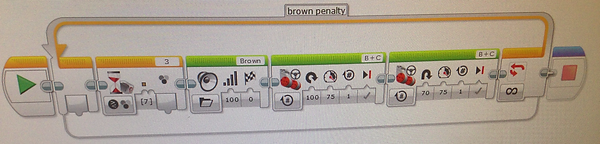
The blue flow chart shows three obstacle the user would have to go through to be able to finish/complete the game but first, the robot would go towards an object(ball) and then pick up the object to begin game which would be the first obstacle done which at the start the user controls the robot. After the first obstacle has been completed, the user would go through the second obstacle which is the maze, where the user would have to find his way out of the maze to be able to go on to the next obstacle. Within the maze there would be an orange wall which will give the user a penalty where the robot would then have to rotate 560 degrees, ONLY if the colour sensor detects the orange wall.
The second obstacle would be the blind maze where the user would control the robot through a blind maze where the user would not be able to see to see where he/she is going. To be able to go through the blind maze the robot would inform the user by telling the user which colour wall is in front of the robot. Different colour walls will be assigned to a direction. For example red would mean right and yellow would mean left but the user would be provided with a map which would have the colour walls assigned to a direction, so that he/she is able to grouch the blind maze.
The yellow chart is the robot fuel. The robot would constant drain fuel only if the user doesn’t re-fuel the robot. Before the robot runs out of petrol, the robot will inform the user by saying that its low on petrol and the user should put petrol in the robot (just going towards the green wall). If the user doesn’t follow the instruction from the robot then the game will be over due to the fact that the robot run out of fuel.
Week Four and five
We started to begin making tests so that the robot does what we want it to do, so that we know what type of problems we are facing before be begin making the program for the obstacle. Once we have made the tests for the robot to do, we have tested each type of different test and we find out a few problems, which one of them was the robot not picking an object. We had to go back to the program to be able to solve the problem, which we did eventually.
Once we have implemented the LRG (Lego robot game) into the NXT and carry out the tests for the robot. We began testing the program that we made on Lego Mind storm. The only problem was that we haven't connected each program that does different things in the program. We started put the programs together to be able for the robot to run all the programs, then us having to pick up the robot and click different programs.
After we sorted out the problems that we were facing, we began making our program which we started to do together, so that we are able to help each other out we different problems and also to be able to know what part of the program actually do, so that we don’t get confuse on which part of the program code actually do.
Where we had to modified the whole robot again due to the fact that the original robot build wasn't able to do the things that we wanted it to do, also the main parts that we wanted to use the most wasn’t able to detect certain things such as the wall and also objects in front of the proximity sensor.
Week six and 8 (Bluetooth image needed)
We have revised the algorithm design with the Bluetooth which enabled us to be able to control the robot using a Bluetooth connectivity controller. We done this by downloading an app on to a mobile phone which we used numbers to be able to navigate the robot. For example, once you pressed 1 the robot would move forward and if you press 0 the robot would pick up an object (ball).
Week 9
We made sure that we done a test with the program so that the Bluetooth function exactly how we want it we the program and make sure there were no problem with the Bluetooth connectivity and the program.
The Demo
We done a demo where we presented our project to a small audience. The demo what we did was to see if our game was functioning as we wanted it to. We explained to our audience about what the game is about and how to play the game. the game we presented was exactly what we wanted it to function which is detecting the colours in the maze, being able to navigate through the game, using Bluetooth communication(controller) and the program we made, is working right.
Demo link
https://www.youtube.com/watch?v=qQihJHU9nbE
screenshot of the complete program
This part of the programs is the colour sensors that would tell the user it has detect, so that the user is able to look at the guide sheet to know which direction to turn because the blue will stand for turning left and the red stand for right.
The fuel system program works by pressing the touch sensor which then will count down from 10 which works by the fuel function deducting 1 every time and once it reaches 0 the game stops.
The game timer program is used to give the user the exact time he or she finished the entire obstacle. This is done by adding on 2 using the timer function then using the text function and then displaying it on the brick screen.
The second program is making the robot dance after the user finished the game but the user would need to press the touch sensor button.
The first two program above is for making the robot turn right 90 degrees and turning 60-65 degrees right.
The third program is used for making the robot pickup an object by user command which the user would have to send a message using mind storm application on their phone and then sending the variable 9 for the function to work.
The fourth program is similar to the third program but this program would drop the object by sending the variable 10.
These program would allow the user to navigate through the obstacle course. To allow the user to control the robot, the user would have to send the variable that the program is assigned to.