



Story board designs concepts:
In the first initial design of the game we decided to have clickable aisles that would change to a different screen with different items populating the shelves.
The program would then display the correct screen which displays items and the user would be able to click on the correct on and it would automatically at to the basket.
The overall design concept was the later changed to a maze like game which spawned different items on the map and then the user would be able to move their in game character model on the items and they would then collect in the list.
Later we then drafted up a drawn representation of what the first menus screen would contain.
The enitre game screen wil then be kept on one singular window with all of the required infromation displayed on the side of the map; allowing you to access sorting methods.


unified modelling language Diagram
Week 1
Week 1 is when we were put into a group of six. We had to know each other before we can get started with our projects. This allowed us to know one another skills which we could put towards our project so that we were able to get things done in a well-mannered time. After few minutes we began deciding on what tools we were going to use for our project, so that our project was able to implement our skills and ideas to actual test. We also created a GitHub group, which we use to upload our codes so that everyone within the group was able to review and edit the code if needed.
Week 2
This week we began learning how to make GUIs, so that we are able to create our program that had GUI for the user to interact with and also being able to have functional program with graphics displayed. After I had a bit of knowledge on how to implement GUI on to our program. We began planning out our ideas on what we can make for users to play. The program would have to enable the virtual robot to search for bargains by itself after the user have given it commands first on what items for the virtual robot to get.
After we have sorted out what we were going to do for our project. We started on our storyboard that would show how the game would look like once we have finished our game. But the storyboard is only a visual on how it would look like but not exactly how it’s going to be due to the fact that we might change the way how our game would function.
Storyboard defines how our GUI would look like after we finished creating our game using python.
Week 3
The team began searching on understanding what and how basic searching algorithms is implemented into python. Each of us began doing worksheet which allowed us to be able to understand the algorithm code a bit more and also being able what code to write due search algorithm having different types of search techniques to use.
We decided to use the binary search searching algorithm which will allow to fine the items that would be implemented in the game which the user would need to find from the list that generated a random shopping list. Reason we didn’t use the linear search is that it would take time for that searching algorithm to find the right items we want to search for.
The UML shows the communication between the user and the computer. This would be done by high level program ad low level program. Which the high level program would let the user be able to interact with the game and the low level code would convert the high level code to 0’s and 1’s to make the computer understand what is going on.
Week 4
As a team we began deciding the best sorting algorithm we can use for our bounty hunter game. We ended up picking the bubble sort algorithm that would sort out the items that user has collected which is displayed in the game, this would be an event driven due to that fact the user would be interacting during the game.
After we have chosen the best algorithm that would fit our game. We began doing research on how to make a bubble sort and decide would be doing the bubble sort code. I decided to do the bubble sort code because I have a good understanding on how it works and what was the best fit to link it with the SQLite database.
Week 5
Week 5 is when we have everything sorted out and we began to start adding our python file/code together so that we can begin testing our game, so that we can see what we need to change so our game can work to perfection and fit our needs for users to enjoy playing our game.
After doing tests we have notice that some of the code couldn’t work together so we decided to make separate file which would import the .py files together by using buttons and functions, which eventually worked. We were able to go to a next screen which the previous screen would get destroyed after the new screen has appeared.
This is where my codes are uploaded on to so that anyone in the group is allowed to comment and edit my code is they find a better solution or something I have done wrong. Also other people would upload their code so that we can join our code together to make our game.
This would be my contribution which is the bubble sort code that is able to work in two ways (descending and ascending). The descending would search for the lowest number and place the value to the lowest to highest. This goes for ascending as well but would start from the highest to the lowest. After I have created the bubble sort. I have made buttons that would be event driven which the use would press the descending button to descend the values and ascending buttons to ascend the values that would display on the screen.
My contributions on GitHub:
-
Bubble sort algorithm
-
Images.zip
-
Link the windows together
-
Map.tmx
-
Map.png
Week 7
We were almost at the end of completing our implementation for our sudo game. Due to fact that we had issue trying to add our code together where some of us did created sudo code and some made it in pseudo code. The only thing we had made is combining the GUI together by importing the each py files together by callback function.
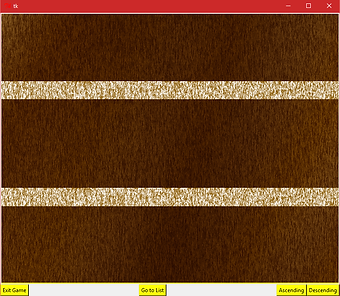
As you can see in the image above, is that the once you click “go to department” function button. It will take the user to the next screen which the previous screen would be destroy so that two screens wont clash together. The department screen appears which has three function buttons which are “Exit Game”, “Ascending” and “Descending”. The problem is that the “Exit Game” function button will have a issue that would be making the python software crash and the ascending and descending buttons would print on the Python Shell screen on the on screen we want it to appear on. Overall the game is starting to work the way we want it to, all we need to do is add all the code together to have a working full game as we wish.
As a group we did a presentation which we presented to group of students that we pretend to be as our clients. The reason why is that we were able to get feedback so that were able to go back to the drawing board and see what we can do to make sure that we have done what the client has asked and also improve and solve the issue in our game. we did exactly what the students have asked by implementing and changing the design a little so that it’s not complicated for user’s to play and also we change the code around so that its object oriented program which the codes would be in classes (self and parents) this makes it a lot more better to understand how the codes run and work.
What we have achieved as a group is that we were able to group together by doing researches on what we can do to make our desired games such as finding the best and simple algorithm’s we can use for our game which isn’t hard to implement and explain how it works.
We have encounter a lot of issues. One of those issues were none of us didn’t really know how to code in python but only know the basics on how it works. The way we have overcome this was helping each other out by explaining what the code does. This allow us to improve our python skills a lot more and also enhancing our knowledge of python even more.
I have learnt to understand how searching algorithm and sorting algorithm works which was a massive thing to mean due to the fact that these allow programs to work and also I gain knowledge on how Pygame is used to create GUI’s and also can be used with other software such as tile map where I’m able to combine my map with Pygame so that I’m able to implement a pathfinding algorithm code around the .tmx file.